Fundamentals
How to Think Like the Engine
Clustered Index and WHERE Clause
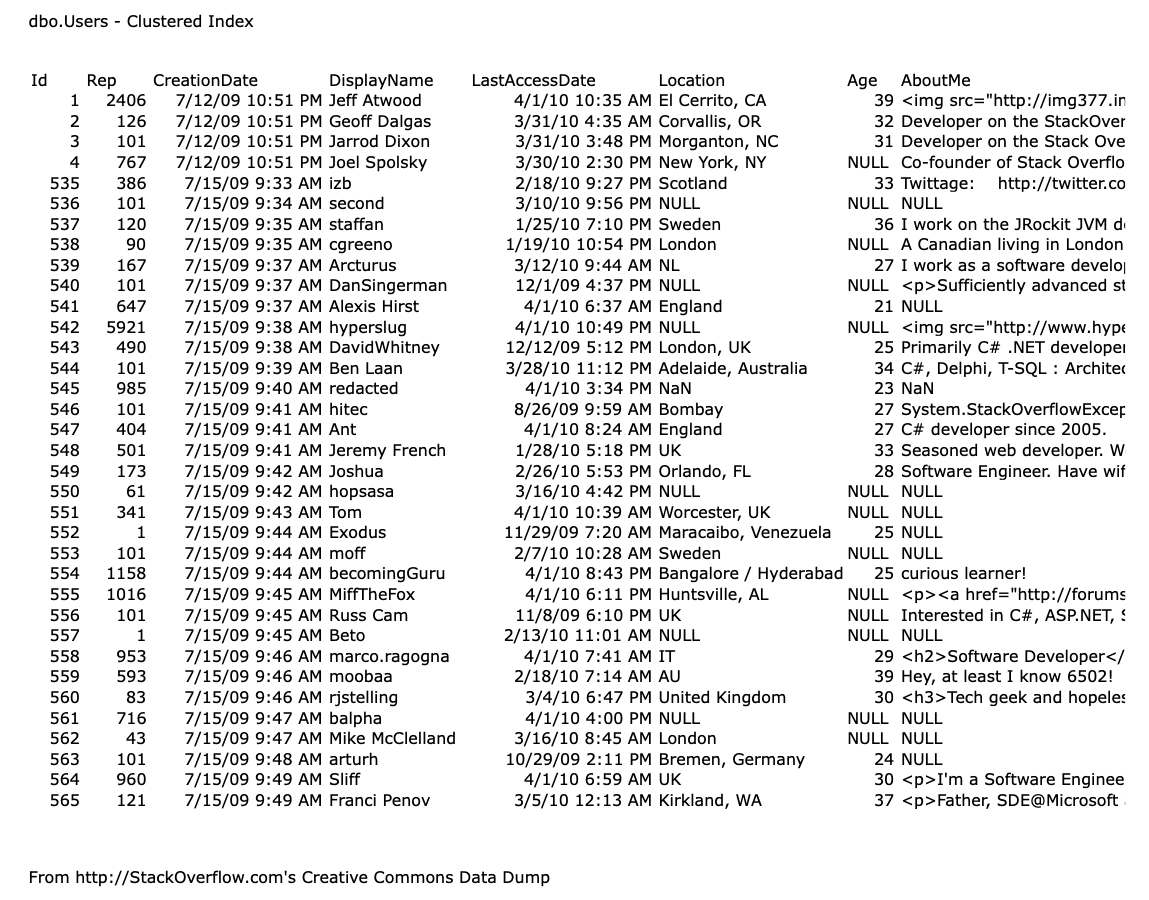
- Clustered Index -> Id table (PK, int, not null): stored 8KB pages (8,192 bytes) in a B-tree structure, which is efficient for range queries and lookups.
- The more you store cluster index the more it will cause performace problem later on, so you should only store cluster index on the column that you will use to filter the data most of the time.
-
A page is the smallest unit of data that SQL Server work with.
-
If we need to read a row:
- Figure out which page has it
- Get that page up in memory (buffer pool)
-
To write a row:
- Get that page up in memory
- Make our changes
- Write the page to disk (write-ahead log)
-
Measuring on query performance: Focus on
logical readsif it read less source data, it's gonna run faster.
The Ideal SQL Server vs. The Real SQL Server
| Ideal SQL Server | Real SQL Server |
|---|---|
| Query is easy to understand | Query is not easy to understand |
| The data you want is only on one page | The data you want is spread across many pages |
| SQL Server knows exactly where to find the data | SQL Server doesn't know exactly which page |
| SQL Server has that page cached, and can jump to exactly that page | SQL Server doesn't have that page cached, and has to read it from disk |
| SQL Server can read the data out as-is, without doing an additional manipulation | SQL Server has to do a bunch of work on the data like sum, group, join, and order by |
ORDER BY and Caching
- ORDER BY will sort data and could eat more CPU resource
- If your query is not using
SELECT TOP 100 FROM dbo.Usersthen you probably don't need to sort the data (using ORDER BY). Note that this is a performance practices. - SQL Server DOES NOT cache the
ORDER BY. It will eat your CPU ($) every time that it runs. (On the other hand, Oracle has "result cache" feature that you can turn it on to cache)
Non-clustered Indexes, Seeks vs Scans
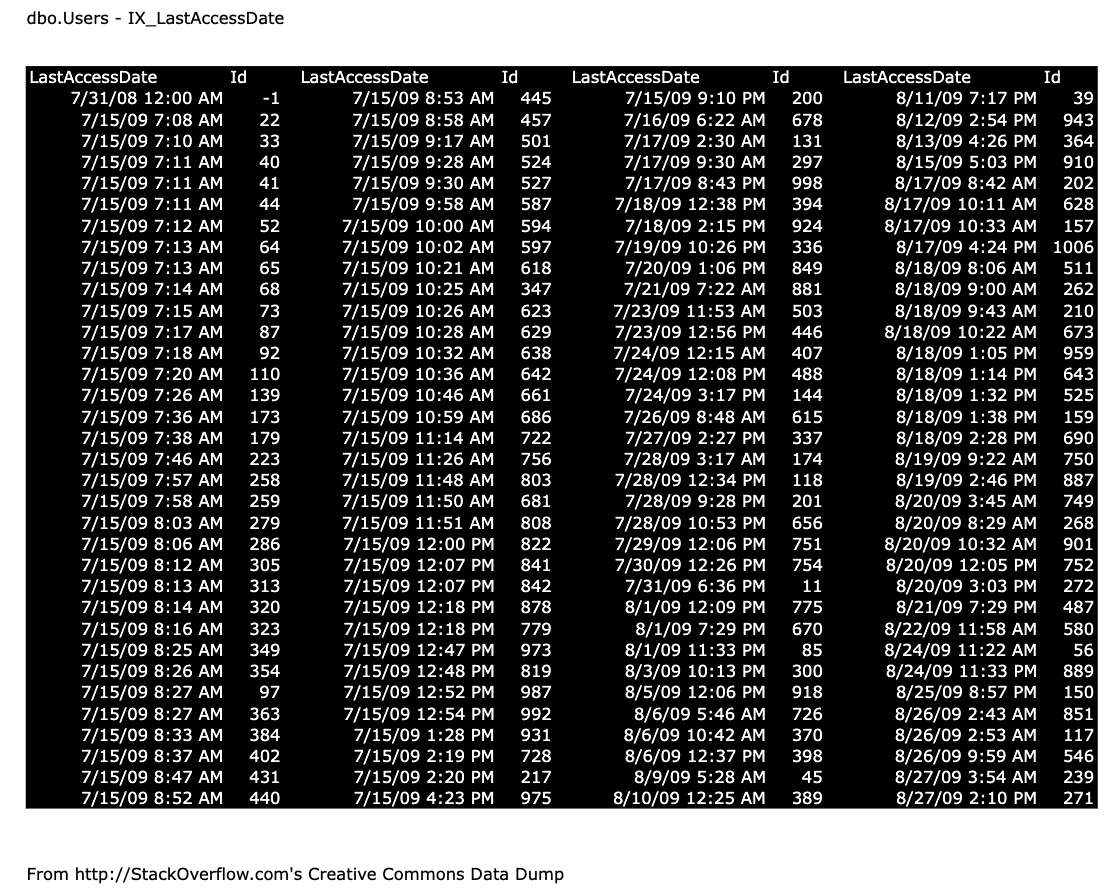
- Stored in order we want, include the fields we want
- Literally a copy of the table
- Clustered index = all of the columns (Has all rows, all columns)
- Nonclustered index = you pick which columns (Has all rows, but not all columns)
DELETEandINSERTnow have to do twice the write (clustered + nonclustered) to keep them in syncUPDATEonly affect copies that have the column being updated- In theory, don't index hot columns (the columns that change all the time)
- In thoery, less indexes are good (generally, 5 indexes or less, with 5 columns or less on each indexes)
How to create Non-clustered Index:
Note: SQL Server will includeId by default
Seeks vs Scans
- Index Seek (NonClustered)
- Index Scan (Clustered)
- Seek: help you read less data and eat less CPU work
- But seek could mean you reading the whole table. It depends on the query and the index. If you have a query that is not selective enough, it will read the whole table and do a scan instead of a seek.
TOPis not sortORDER BY. It's more like head of the table.
Key Lookups, the Tipping Point, and Cost-Based Optimization
- It's not a good idea to use "index hints" (Let the engine decide which index to use)
- Pick the right tool for the right job. Key look up is one of the tool.
This is one of the tool that available (but it barely use)
Bad Quries and Wider Indexes
- To check low performance queries: Read the excution plan from right to left, top to bottom. Look for the first place where estimated vs actual rows is off by a lot.
- Wider indexes is basically add more columns to the index. It will make the index bigger and slower to read, but it will make the query faster because it will reduce the number of key lookups.
- Wider indexes rules of thumb: Just get the right columns on the page and make sure the first column is something you searching for. (first column is important in filtering)
New DBA:
CREATE INDEX IX_LastAccessDate_Id_DisplayName_Location
ON dbo.Users (LastAccessDate, Id, DisplayName, Location);
Old DBA:
CREATE INDEX IX_LastAccessDate_Id_Include
ON dbo.Users (LastAccessDate, Id)
INCLUDE (DisplayName, Location);
Conclusion
- Indexes: literally a copy of parts of the table
- Good: indexes reduce page reads, CPU for srts
- Bad: indexes slow down D/U/I work
- Seek means jump to one area and start reading
- Scan means start at either end of the index
- Neither seek nor scan refers to how much we'll read
Big data version
How to think like the engine but for big data.
- You should index the joint. Which are the columns that frequently
JOINlikeIdand PrimaryKey column - It's important to do "Pagination"
Backup & Restore
Database Engine: SQL Server
3 Common Backup Strategies
- VM snapshot backups, taken frequently: Easy to implement, but a silo
- daily full natgive SQL backups: Easy to implement, but a lot of data loss
- daily full native SQL backups + transaction log backups: A little harder to implement, but super flexible
Commonly used products: - Veeam - SnapManager - NetBackup - Backup Exec - AppAssure
VM snapshot backup
3rd party products backup servers, files, and databases by taking periodic snapshots with VSS (Volume Snapshot Service)
- VSS snapshot is best for
- Standalone servers with <=35 databases
- Third party apps (accounting, HR, infrastructure)
- Configure the snapshot software so that it's application-aware and inactivate SQL Server's writes
- The more we want 0 data loss, the more frequent we need to backup
- Snapshot backup need to balance 1) How long the backups take (and how much they interfere with load) and 2) How frequently you take them
- Ideally, take snapshot as frequently as practical: like every 15 minutes would be greartg for most shops
Advangtages:
- Easy to configure (even with app awareness)
- Let you manage your SQL Server backups the same way you manage any other server's backups
- Good enough to meet most common business goal. Most of them are okay losing ~15 minutes of data, and being down while you restore the snapshot
Disadvantages:
- When configure poorly, performance is terrible: causes frequent freezes, affecting end users
- Not useful for common data-related tasks like 1) Copying data to development servers 2) Giving data to outside partner, companies 3) Keeping a reporting server in sync
Daily Full Native SQL Backups
- This exist before VSS
- Using
BACKUP DATABASESQL Server command, which has lots of options but it basically:- Reads as quickly as it can from the data & log files
- Shoves the data out to a new file (could be local, network share, or cloud)
- When it's done, also copies enough transactional data so that it can recover the database to a single point in time (because the backup may take time)
Advantages:
- Easy to configure (maintenace plans)
- Easy to perform the restores (if you only have a few databases)
- Works the same way wheter it's a VM or physical box
- Has worked the same way for decades
- Lets you use encryption to protect the data at rest
- Easy to give backups to other parties, refresh dev
Disadvantages:
- It backup the entire database
- Adds a layer of complexity: need to monitor to know that the backups are working, you may also need to backup the backup files, moving them to other storage or another site
-
Painful to do restores when you have dozens of databases: you'll need to learn to automate it
-
Who it's great for
- Reporting, data warehouse servers where we don't mind losing a day of data
- Servers where we don't have licensing for VSS snapshot tools, and the data isn't critical
Full Backups + Transaction Log Backups
- Recommended for mission-critical servers
- If you unplug the SQL Server, it will recover well because it read the LOGS
- How log backups save you
- Midnight: take a full backup
- 1AM: take a transaction log backup, which contains all of the transactions since the last log backup
- 2AM: take another log backup... and all day, hourly: take log backups
- 4:30PM: BOOM!, the server crashes
- Resotre: the full backup, and all the log backup since
Advantages
- Minimized data loss (even down to restoring right before a single bad transaction)
- Works the same way whether it's a VM or physical
- Has worked the same way for decades
- Encryption ready
- Easy to give backup to other parties, refresh dev
Disadvanteges
- Painful to restore lots of log backups across lots of databases: better use automation
- Restoring to a point-in-time isn't as easy as it sounds
- If you want disaster recovery, you can't just sync the VM across data centers: now you have to build another SQL Server, restore the data backup
- If the log isn't backed up regulary, it can grow, causing disk space issues
Recovery Models
Set at hte database level: right-click on the DB
- Full recovery:
- All transactions are logged
- The transaction log is only cleared by transaction log backups
- Simple recovery:
- All transactions are still logged
- The log is cleared as transactions finish
Which recovery model to choose
- Daily full backups only? → Simple recovery model
- Daily fulls + transaction log backups? → Full recovery model
- Snapshot backups with VSS? → Check with your software vendor's documentation
Backup Security
- Databases often contain sensitive, unencrypted PII (Personally Identifiable Information). Backups should be secured, and administrators should consider encrypting both the data at rest and the backups themselves to prevent unauthorized access.
Restore
How to do a one-time restore (Note: read the docs due to feature changes)
- VSS snapshots are simple:
- Give the users the list of VSS snapshot times
- Let them pick which time to restore
-
SQL Server native backups (more complex):
- Decide the point in time to aim for
- Restore the full backup before that time
- Restore the last differential backup before time
- Restore all the logs up to that point
-
The Golden Rule: Never restore a backup over an existing production database. Always restore to a new database name to prevent accidental data loss, and allow users to extract the specific objects they need
- Restore to a differrent server
- Keep the restored copy in read-only mode
- Then, copy over when you need
-
Restoring Multiple Databases: Be aware that SQL Server backups run serially, not simultaneously. If your application spans multiple databases, you may encounter data inconsistencies where transactions exist in one database but not another
-
System Databases: Restoring master, model, or msdb is rare and complex. If a system database is compromised, the instructor suggests that a full server rebuild is often safer and more reliable than a restore
-
Disaster Recovery & Automation: When a server is completely destroyed, rebuilding from scratch is often preferred over simple restoration. The instructor advocates for using tools like PowerShell and dbatools to automate the recreation of logins, agent jobs, and permissions, which are essential for production DBAs to master
Important Considerations:
- High Availability Gotchas: Features like Always On Availability Groups or replication are broken by restores and require manual reconfiguration
- Preparation: Testing and practice are vital. Using tools like sp_Blitz helps maintain an awareness of your server configuration, making it easier to recreate the environment during an emergency
SysAdmin & Developer
This is a SQL Server "Maintenance Plans" for System Admin and Developer to protect their servers without requiring extensive T-SQL knowledge. This approach is intended for those looking for an easy, safe setup, while professional DBAs should refer to the Ola Hallengren scripts instead.
Core Maintenance Strategy
Creating two separate maintenance plans to ensure robust protection:
- Overnight Maintenance Plan: This plan handles heavy, once-a-day tasks.
- Tasks include: Database integrity checks, full backups, history cleanup, and maintenance cleanup (deleting old backups).
- Index Management: Depending on the edition, users should either reorganize and update statistics (Standard Edition) or rebuild indexes (Enterprise Edition)
- Transaction Log Backup Plan: Designed to run every five minutes to minimize data loss.
- Key focus: Captures database changes frequently to ensure recovery point objectives are met
Best Practices Highlighted
- Automation & Defaults: The wizard is used for convenience, but the host warns against accepting default settings
- Backup Destinations: Using UNC paths to move backups off the server immediately
- Safety Measures: Always enable backup compression and checksums to ensure data integrity and storage efficiency
- Retention: Maintain at least one week's worth of backup history to handle potential weekend incidents or prolonged absences
Monitoring
Users are encouraged to verify the performance of these jobs by checking the duration history after they have run. If a job takes an excessively long time, it may be necessary to have discussions with management regarding hardware limitations or task scheduling.
sp_configure
Configuring SQL Server to improve performance and reliability. While default settings are generally sufficient, but for VM environment we should peak into sp_configure.
Key Configuration Recommendations
- Maximum Degree of Parallelism (MAXDOP): Avoid letting a single query consume all CPU cores. For virtual machines, calculate an appropriate setting by dividing total cores by the number of "ugly" queries you want running simultaneously, with 8 being a recommended maximum
- Backup Checksum Default: Enable this (available in SQL Server 2014 and newer) to ensure data is checked for corruption during backups, as the default setting skips this validation
- Max Server Memory: Limit SQL Server to 90% of total system RAM to ensure the OS and other applications remain stable under memory pressure
Additional Settings and Considerations
- Cost Threshold for Parallelism: The default value of 5 is often too low, causing unnecessary parallel execution for small queries
- Backup Compression: Enabling this as a default ensures backups are stored efficiently
- Plan Cache Impact: Be aware that changing settings like MAXDOP, Cost Threshold, and Max Server Memory (especially lowering it) will typically clear the plan cache, which may impact performance temporarily
Database Indexes
Indexes are database objects that enhance the speed of data retrieval operations. They function by creating a quick lookup mechanism for data based on one or more columns in a table, much like an index in a book helps you find information quickly. Namely, indexes reduce the amount of disk I/O needed to access data, thereby boosting overall database performance.
| Index type | Description | Use case |
|---|---|---|
| Clustered index | Determines the physical order of the data in the table. | Primary key columns where sorted data access is essential. |
| Non-clustered index | Creates a separate structure with pointers to the data. | Frequently queried columns like email or date_of_birth. |
| Unique index | Ensures that all values in the index are unique. | Ensuring uniqueness in fields like email or username. |
| Composite index | Indexes multiple columns in combination. | Queries filtering on multiple columns, like first_name and last_name. |
| Full-text index | Facilitates fast text searches in large text fields. | Searching through large text fields like description or comments. |
Clustered-index behavior varies by engine — don't treat it as universal. SQL Server and MySQL/InnoDB store table rows in clustered-index order and allow only one clustered index per table. PostgreSQL has no storage-level clustered index: heap tables are unordered by default, and CLUSTER performs a one-time physical reorder rather than maintaining order continuously.
Database Partitioning
What is database partitioning and when would you use it?
- db partitioning is dividing a large table into smaller, more manageable pieces called partitions.
- Each one stored separately and can be queried individually, thus, significantly improve performance and manageability, especially for very large datasets
- Partition when the workload can prune to a subset of partitions (e.g., queries filter on the partition key) and when partition-level maintenance (archiving, purging, reindexing) meaningfully reduces operational cost — table size or a slowdown alone isn't sufficient justification, since partitioning adds operational complexity.
- For instance, in a table storing historical transaction data, I might partition the data by month or year. This allows queries that target specific time periods to access only the relevant partition instead of scanning the entire table, thus improving performance.
- Additionally, partitioning can make maintenance tasks, like archiving or purging old data, more efficient since these operations can be performed on individual partitions rather than the whole table.
| Partitioning type | Description | Example use case |
|---|---|---|
| Range partitioning | Divides data into partitions based on a range of values in a column. | Partition a sales table by order_date (e.g., one partition per year). |
| List partitioning | Partitions data based on a specific list of values. | Partition a customers table by country or region. |
| Hash partitioning | Distributes data across partitions using a hash function. | Distribute rows evenly for load balancing across multiple partitions. |
| Composite partitioning | Combines two or more partitioning strategies (e.g., range + list). | Partition by order_date (range) and then by region (list). |
Database Replication
Database replication is copying and maintaining database objects across multiple servers, for redundancy and availability. Replication alone doesn't guarantee failover, 24/7 uptime, or zero data loss — those depend on the topology, consistency mode, and an explicit failover design on top of replication.
- Synchronous: the primary waits for a configured number of replica acknowledgements before committing, keeping replicas caught up at the cost of write latency.
- Asynchronous: the primary commits without waiting for replicas, so replica lag can vary from milliseconds to much longer under load — there's no guaranteed bound.
- More: Replication is particularly useful in scenarios where uptime is critical, such as for e-commerce platforms, where users expect the database to always be available, even during maintenance or hardware failures. Achieving that in practice also requires a defined failover procedure, not replication alone.
Types of Database Replication
| Feature | Single-primary (primary/replica) | Multi-primary |
|---|---|---|
| Write operations | Writes occur only on the primary node. | Writes can occur on multiple nodes. |
| Read operations | Reads can be offloaded to replica nodes. | Reads can occur on any primary node. |
| Use case | Used when reads outnumber writes, and eventual consistency is acceptable. | Used in distributed systems with multiple write locations. |
| Conflict handling | No conflicts (since only one node writes). | Requires conflict resolution mechanisms. |
| Example | MySQL primary/replica replication, MongoDB replica sets (single-primary) | Cassandra (masterless, multi-primary) |
Database Views
- Database view is a virtual table
- It based on a query's result. NO store data, only displays data retrieved from one or more underlying tables
- More: Views simplify complex queries by allowing users to select from a single view rather than writing a complicated SQL query. Views also enhance security by restricting user access to specific data fields without giving them access to the underlying tables. For example, a view might only expose certain columns of sensitive data, such as a customer's name and email, but not their financial information.
Database Scalability
- Vertical scaling This involves adding more resources, such as CPU, memory, or storage, to the existing database server. While it's the simplest approach, it has its limits since hardware can only be upgraded to a certain extent. I would use vertical scaling as a short-term solution or in scenarios where the database isn't extremely large or doesn't require frequent scaling.
- Horizontal scaling Distributing load across servers or nodes rather than growing a single machine. This covers a few distinct techniques: read replicas (offload reads to copies), partitioning (split a table within one database), and sharding (split data across separate database instances) — scaling out doesn't automatically mean repartitioning data.
- Replication Replication involves copying data to multiple database servers to distribute the read workload. I would set up master-slave or master-master replication to allow multiple servers to handle read requests, improving read scalability. This method also adds redundancy, which enhances data availability and fault tolerance.
- Database indexing and query optimization By analyzing and optimizing slow queries, adding appropriate indexes, and avoiding expensive operations like full table scans, I can reduce the load on the database, which indirectly contributes to scalability.
- Caching Implementing a caching layer, like Redis or Memcached, helps offload frequently accessed data from the database. By storing and retrieving common queries from the cache, I can reduce the load on the database, resulting in faster response times and improved scalability.
- Partitioning Database partitioning involves splitting a large table into smaller, more manageable pieces, improving query performance and making data management more efficient. For example, I might partition a large transactions table by date, so queries that target specific time ranges only scan the relevant partitions, reducing I/O and speeding up response times.
OLTP vs. OLAP vs. LTAP
| Feature | OLTP | OLAP | LTAP |
|---|---|---|---|
| Focus | Transactional processing | Analytical processing | Unified transactional & analytical processing |
| Query type | Simple, frequent transactions | Complex, long-running queries | Both (separated compute on shared storage) |
| Workload | Many small, concurrent transactions | Large data sets, often historical | Single shared copy for active and historical data |
| Schema design | Highly normalized | Often denormalized | Open table formats (e.g., Delta, Iceberg) |
| Typical use case | E-commerce, banking systems | Data warehouses, reporting systems | AI agents, real-time operational analytics |
| Examples | MySQL, PostgreSQL | Redshift, Snowflake | Databricks (Lakebase + Lakehouse) |
- Acronym:
- OnLine Transaction Processing (OLTP)
- OnLine Analytics Processing (OLAP)
- Lake Transactional/Analytical Processing (LTAP) it basically OLTP + OLAP
Clustered vs. Non-Clustered Index
| Feature | Clustered index | Non-clustered index |
|---|---|---|
| Definition | Determines the physical order of the data in the table. | Creates a separate structure with pointers to the physical data. |
| Number of indexes | Only one clustered index per table (since it defines the physical order). | Multiple non-clustered indexes can exist on a single table. |
| Effect on data storage | Directly impacts how the data is stored on disk (sorted). | Does not affect the physical storage of data. |
| Use case | Typically applied to the primary key or a column frequently queried for sorted results. | Used for columns frequently queried but not necessarily in sorted order (e.g., search operations on email, date). |
| Data access | Faster when querying by the indexed column since the data is physically ordered. | Requires additional lookups (via pointers) to retrieve the actual data. |
| Storage structure | Stores both the data and the index together in the same structure. | Stores only the index separately, with pointers to the actual data rows. |
| Example | Clustered index on CustomerID to sort data by customer. |
Non-clustered index on Email or OrderDate to speed up specific searches. |
Migrating On-Premises Databases to the Cloud
- Assessment and planning Start by assessing the existing database environment to understand the schema, data size, and application dependencies. Next, I'd select the appropriate cloud service and instance type based on the workload requirements – it's important to plan for network configuration, security, and compliance considerations.
- Data migration strategy Choose a strategy based on the downtime budget: an offline migration (stop writes, copy, cut over) is simplest but incurs application downtime; a minimal-downtime migration uses a tool like AWS DMS or Azure Database Migration Service in full-load-plus-CDC mode to keep the target in sync until cutover. For very large databases, AWS Snowball can handle the initial bulk transfer out-of-band, with DMS/CDC handling the delta afterward.
- Testing Conduct thorough testing in a staging environment that mirrors the production setup. Test the data migration process, connectivity, performance, and failover scenarios to identify any issues before the actual migration.
- Minimal downtime cutover Plan the final cutover during a low-usage period. Use database replication to keep the cloud database in sync with the on-premises database until the final cutover to ensure minimal downtime and data loss.
- Post-migration validation After migration, validate data integrity, run performance tests, and monitor the cloud database to ensure everything operates as expected.
Security in Cloud-Based Databases
- Data encryption Enable encryption both at rest and in transit. For at-rest encryption, I use the cloud provider's encryption services like AWS KMS or Azure Key Vault to manage encryption keys. For data in transit, I use SSL/TLS to encrypt connections between the application and the database.
- Access control Implement the principle of least privilege by granting only the necessary permissions to users and applications. Use Identity and Access Management (IAM) roles and policies to control access to the database and its resources. Additionally, enable multi-factor authentication (MFA) for administrative access.
- Network security Utilize Virtual Private Cloud (VPC) or Virtual Network (VNet) configurations to isolate databases within a secure network. Use security groups, firewalls, and network ACLs to restrict access to the database to trusted IP addresses or subnets.
- Monitoring and auditing
Enable engine-specific audit logging for query execution — e.g., PostgreSQL's
pgaudit, MySQL's audit log plugin, or RDS/Aurora database activity streams — since AWS CloudTrail records control-plane API calls (who calledCreateDBInstance, etc.), not the SQL queries run inside the database. CloudTrail, Azure Monitor, or Google Cloud Audit Logs are still useful for tracking infrastructure-level changes. - Compliance and regular security audits Database settings and audit logging are technical controls that support compliance with regulations like GDPR, HIPAA, or Thailand's PDPA — they don't establish compliance on their own. Treat this as one input to a formal compliance assessment owned by legal/compliance, alongside regular security audits and vulnerability assessments.
On-Premises vs. Cloud-Based Database Management
- On-premises: It's basically that you own your server (hardware infrastructure). Meaning that you have to do backups, patching, and monitoring all by yourself at your own expense, time, manpower, and effort.
- Cloud-based: For a configured managed service like AWS RDS, you pay for the service and the provider handles scaling compute/storage, built-in high availability, and automated backups with a few clicks. This isn't automatic for every cloud-based database, though — a self-managed database running on a cloud VM still needs you to configure backups, failover, and patching yourself; the guarantees apply to the managed-service tier, not to "cloud" in general.